Dreamy Room Level 551
Level 551 guide walkthrough, helping players solve puzzles and explore the wonderful world of Dreamy Room.
Dreamy Room Level 551 Walkthrough Guide
Dreamy Room Level 551 Room Story
Get ready to rock out in the ultimate music studio where adorable animal musicians put on the show of a lifetime. This Dreamy Room Level 551 concert venue features a spectacular stage with flame designs where a pink cat keeps the beat on drums while a yellow cat shreds an electric guitar. The DJ bear spins tracks from the mixing station as a passionate singer belts out tunes center stage. Purple and pink speakers blast music throughout the room while golden music notes dance across the walls. From the iconic Rock Star amplifier to the dazzling string lights and star decorations, every corner pulses with rock and roll energy waiting for the next epic performance.
Dreamy Room Level 551: Step-by-Step Placement Guide
Step 1. Install Stage Platform
Drag the stage platform to cover the main floor area. This black platform with flame stage design should form the concert stage foundation in Dreamy Room Level 551.
Step 2. Build Metal Stage Truss
Position the metal stage truss at the back center of the stage. This metal framework should provide mounting points for lights and equipment.
Step 3. Add Stage Step
Place the stage step at the front edge of the platform. This step should allow performers to access the elevated stage in Dreamy Room Level 551.
Step 4. Install Arched Mirror Portal
Drag the arched mirror portal through the arched doorway on the right wall. This purple and gold decorative arch should frame the entrance dramatically.
Step 5. Mount Wall Speakers
Position wall speaker 1 and wall speaker 2 on the right wall above the stage. These purple speakers should blast sound throughout Dreamy Room Level 551.
Step 6. Add Music Notes Wall Art
Place the music notes wall art on the upper right wall. This golden musical staff decoration should add artistic flair to the studio.
Step 7. Hang String Lights
Drag the string lights along the right wall beneath the music notes. These warm bulb lights should create ambient concert lighting in Dreamy Room Level 551.
Step 8. Mount Guitar Picture Frame
Position the guitar picture frame on the right wall near the corner. This artwork featuring a guitar adds rock theme decoration.
Step 9. Install Pink Wall Guitar
Place the pink wall guitar on the left wall as decoration. This iconic pink electric guitar should hang prominently in Dreamy Room Level 551.
Step 10. Add Pink Guitar Icon
Position the pink guitar icon on the upper left wall. This small guitar symbol adds additional rock decor to the space.
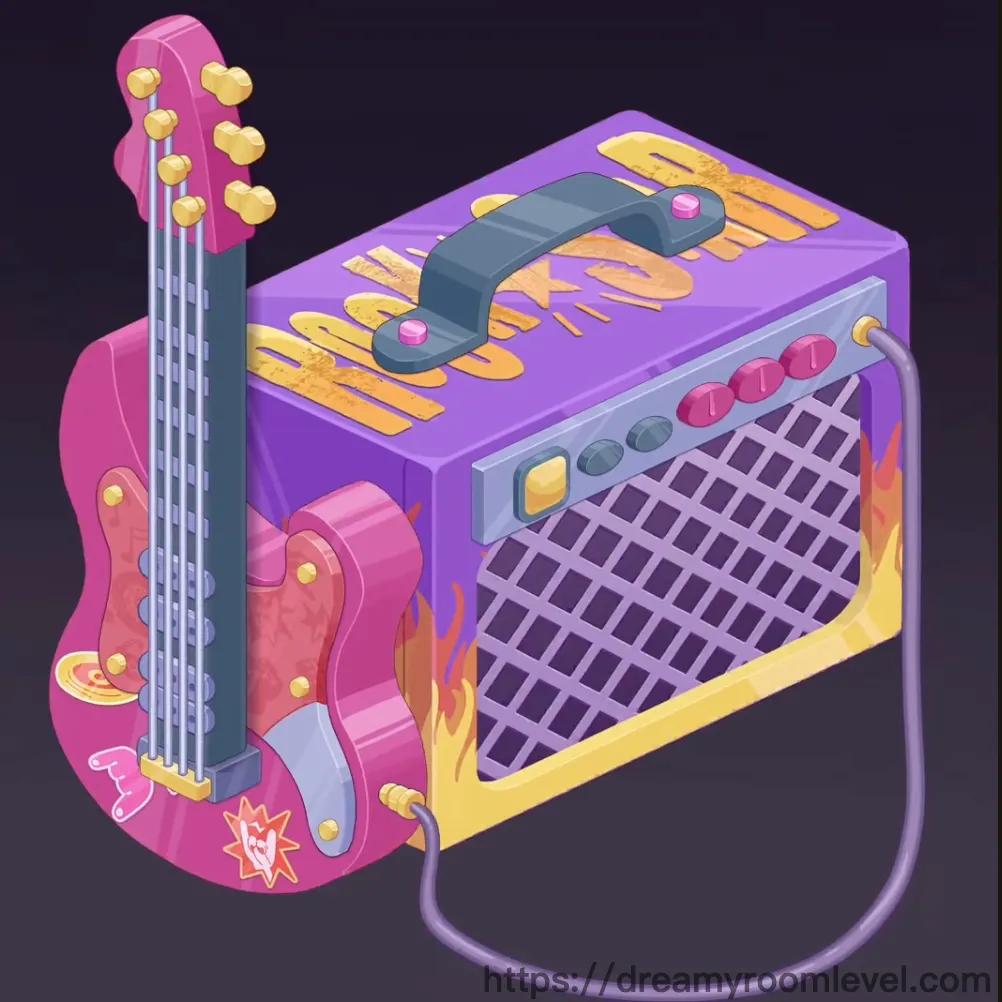
Step 11. Set Up Rock Star Amplifier
Drag the rock star amplifier to the right side of the stage. This purple amp with flame design should power the electric guitars in Dreamy Room Level 551.
Step 12. Position Speaker Stack
Place the speaker stack on the left side near the window. This tower of speakers and equipment should provide additional sound power.
Step 13. Add Purple Floor Speakers
Position purple floor speaker 1 and purple floor speaker 2 at the front of the stage. These speakers should face the audience area in Dreamy Room Level 551.
Step 14. Place Floor Monitor Speaker
Drag the floor monitor speaker on the stage floor angled toward performers. This monitor should help musicians hear themselves while playing.
Step 15. Install Red Keyboard Setup
Position the keyboard stand on the right side of the stage and place the red keyboard on top. This synthesizer should be ready for melodies in Dreamy Room Level 551.
Step 16. Set Up Drum Kit
Drag the drum kit to the center-back of the stage near the truss. Add the cymbal set and position the drum stool behind it.
Step 17. Add Tambourine
Place the tambourine near the drum kit area. This percussion instrument should be within reach of the drummer in Dreamy Room Level 551.
Step 18. Set Up DJ Station
Position the dj mixing table on the elevated left platform and add the dj turntable on top. This setup should be the DJ's command center.
Step 19. Install Stage Spotlights
Place stage spotlight 1 and stage spotlight 2 mounted on the truss or walls. These lights should illuminate performers in Dreamy Room Level 551.
Step 20. Add Disco Light Orb
Drag the disco light orb near the left window area. This glowing sphere should cast dancing lights across the stage.
Step 21. Position Microphone Stand
Place the microphone stand at center stage front. This stand should hold the main vocal microphone in Dreamy Room Level 551.
Step 22. Add Camera Tripod
Position the camera tripod near the speaker stack area. This equipment should be ready to record the performance.
Step 23. Place Audio Cables
Drag the audio cables connecting various equipment pieces. These cords should run between instruments and speakers in Dreamy Room Level 551.
Step 24. Add Cassette Tapes
Position cassette tape 1 and cassette tape 2 near the DJ station or speaker stack. These retro tapes add vintage music studio charm.
Step 25. Place Purple Storage Box
Drag the purple storage box near the equipment area. This container should store extra music gear in Dreamy Room Level 551.
Step 26. Install Metal Barrier Fence
Position the metal barrier fence at the front left corner of the stage. This crowd control barrier should separate the stage from the audience area.
Step 27. Add Potted Plant
Place the potted plant near the barrier fence or entrance. This green plant should add a touch of nature to the rock venue in Dreamy Room Level 551.
Step 28. Hang Star Decorations
Position yellow star decoration 1 and yellow star decoration 2 above the stage area. These golden stars should sparkle overhead.
Step 29. Add Star Garland
Drag the star garland across the DJ station area. This string of stars should add festive decoration in Dreamy Room Level 551.
Step 30. Place Balloons
Position the pink balloon and red balloon floating near the left side of the stage. These party balloons should add celebration vibes.
Step 31. Position DJ Bear Character
Drag the dj bear character to sit at the DJ station. Add the dj headphones on this cute bear spinning tracks in Dreamy Room Level 551.
Step 32. Add Pink Cat Drummer
Place the pink cat drummer seated on the drum stool behind the drum kit. This energetic pink cat should be ready to keep the beat.
Step 33. Position Singer Character
Drag the singer character to center stage near the microphone stand. Add the handheld microphone for this passionate performer in Dreamy Room Level 551.
Step 34. Add Yellow Cat Guitarist
Place the yellow cat guitarist on the right side of the stage and give them the red electric guitar. This cool cat should be ready to shred some epic riffs and complete the rock band lineup.
Tips and Tricks
Common Mistakes
- The stage platform must be placed first before positioning any performers or equipment; placing items on empty floor creates incorrect elevations in Dreamy Room Level 551.
- Players often confuse the pink wall guitar decoration with the red electric guitar held by the yellow cat; the wall guitar is decorative while the red one is for the performer.
- The DJ station sits on the elevated left platform separate from the main stage; placing the DJ bear on the main stage area is incorrect positioning.
- Multiple speakers exist in different locations; wall speakers mount high on walls while floor speakers sit at stage level and monitors face performers.
- Star decorations come in multiple forms; the yellow stars float individually while the star garland strings across surfaces.
Useful Strategies
- Build the stage infrastructure first: platform, truss, and step create the foundation before adding any equipment or performers to Dreamy Room Level 551.
- Complete the sound system in zones; finish all left-side audio equipment including speaker stack and DJ station before working on right-side keyboard and amplifier setup.
- Position all four performers last after their respective stations are complete; the DJ bear needs the mixing table, drummer needs the kit, singer needs the microphone stand, and guitarist needs the amplifier.
- Use the metal truss as a reference point for centering the drum kit and hanging star decorations; items should align symmetrically around this structure.
- Group decorative elements by type; hang all wall items first including guitar, picture frame, and music notes, then add floating elements like balloons and stars.
- The flame design stage and Rock Star amplifier share the same fire aesthetic; position them to visually complement each other in this energetic music studio.