Dreamy Room Level 597
Level 597 guide walkthrough, helping players solve puzzles and explore the wonderful world of Dreamy Room.
Dreamy Room Level 597 Walkthrough Guide
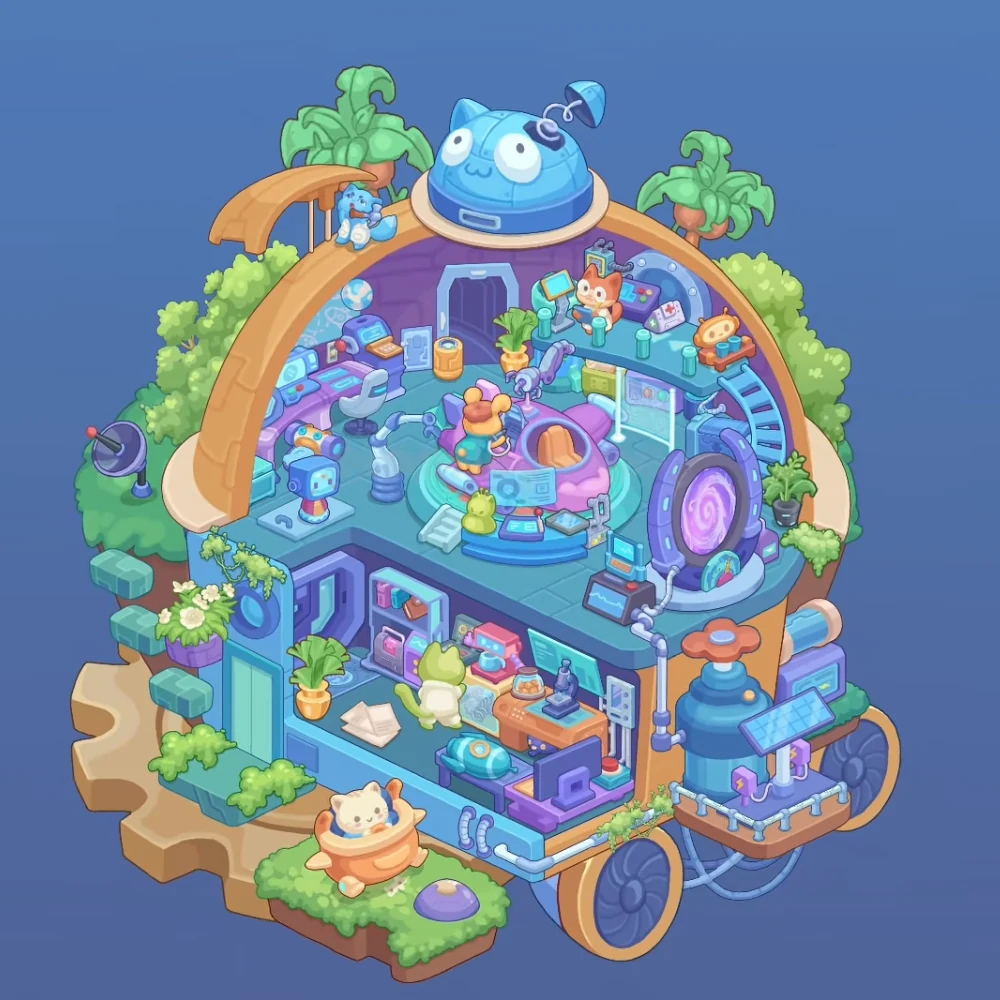
Dreamy Room Level 597 builds a science laboratory inside a large gold arch. The main floor holds a circular capsule and glowing portal, with a second workroom below. The blue tank and solar panel occupy the outside right edge. Directions follow the image as viewed.
Step 1. Finish the arch and rooftop details
Fit the gold arch and blue cat dome around the upper laboratory. The large blue dome sits at the arch's highest point, with its cat-like face toward the viewer and its spring antenna bending to the right.
Place the upper plants and small blue robot along the arch. The two potted leafy plants rise behind its ends. The small blue robot sits near the curved awning on the upper-left side.
Step 2. Arrange the left control station
Position the left control desk and office chair against the upper room's back-left wall. The purple desk follows the curve of the room and carries several blue screens. The pale office chair faces these controls.
Set the small globe and rear doorway near this workstation. The globe stands on the desk's back edge, while the tall dark doorway occupies the rear center. The yellow cylindrical bin sits near the doorway.
Step 3. Add the front left equipment
Place the cube robot and articulated arm on the main floor's left side. The small blue cube-headed robot stands near the front edge; the pale jointed arm rises between it and the central capsule.
Keep the colorful control device behind the cube robot, closer to the wall console. The small dish antenna belongs outside the arch on the far-left green ledge.
Step 4. Set up the central capsule
Fit the pink capsule and orange seats into the center of the main floor. Its circular turquoise base surrounds the pink shell, and the open orange seats face the front.
Place the orange operator and overhead arms around the capsule. The orange character occupies the left seating position with its back toward the viewer. Purple mechanical arms rise over the capsule from behind.
Step 5. Fill the capsule control desk
Put the curved blue console and green duck along the front of the circular base. The little green duck sits at the console's left side beside the short pale steps. Flat control panels and small devices fill the center and right sections.
Step 6. Furnish the raised medical platform
Place the upper medical platform and ladder against the back-right wall. The curved blue ladder climbs its right edge from the main floor.
Arrange the medical chair monitors and first aid case across this platform. The orange character sits near the left monitor. The white case marked with a red cross rests farther right, and the small orange seat stands beside the ladder landing.
Step 7. Position the glowing portal
Set the purple portal and connected monitors at the main floor's front-right edge. Its oval frame faces into the room, with the bright violet spiral centered inside.
Place the small blue screen and dark waveform display near its left base. The pale pipe bends away from the portal and continues down the outside wall.
Step 8. Fill the lower workroom
Arrange the lower shelves and green doorway along the lower room's left wall. Books and pink containers fill the open shelves. The tall green inset panel stands at the far-left side, below the flowering ledge.
Place the lower desks and green worker along the back and right walls. The green character faces the pink countertop machine. The orange workbench to its right carries the microscope and a plate with a small pastry.
Set the blue examination couch and purple computer near the lower room's front edge. The narrow blue couch sits behind the foreground computer desk. Loose papers lie on the floor to the left, beside the potted plant.
Step 9. Connect the outside machinery
Position the blue tank and orange valve on the right exterior platform. Its broad orange wheel sits above the tank, while the pale pipes run along the lower platform edge.
The solar panel and battery blocks stand in front of this tank. Tilt the blue gridded panel toward the viewer and place the small purple lightning-marked blocks beneath it. Large dark wheels occupy the structure's lower-right side.
Step 10. Add the outer garden details
Arrange the leafy planters and orange cat pod around the lower exterior ledges. Flowering greenery hangs beside the lower-left doorway and along the room edges. The cream cat sits inside the round orange pod on the bottom-left grassy ledge, beside the purple floor button.
Final placement check
The capsule, medical platform, and portal belong upstairs. The green worker, microscope, blue couch, and purple computer stay in the lower room. The valve tank and solar panel sit outside on the right, with the orange cat pod on the opposite side.